
AI-Powered API Debugging with WePROXA: Two Real Workflows
An AI agent can read source code, but the hardest API bugs often live outside the repository: a request has the wrong header, an origin returns an unexpected status, or the frontend receives a payload nobody anticipated.
WePROXA gives the agent controlled access to the traffic that actually crossed your machine. Through the Model Context Protocol (MCP), it can inspect captures, explain failures, create debugging rules, and verify which response your app received.
This guide connects an AI client, diagnoses a real 503 Service Unavailable response, then replaces that response with an inline Map Local fixture. The first workflow is read-only. The second changes WePROXA state and asks for confirmation before doing so.
Before you begin
Section titled “Before you begin”You need:
- WePROXA running on the same macOS or Windows computer as the AI client;
- an active WePROXA Pro license;
- the proxy running and capturing HTTPS traffic; and
- an MCP-capable client such as Codex, Claude Code, GitHub Copilot, or Cursor.
If you have not captured traffic yet, start with From Download to Request Bodies.
1. Start the WePROXA MCP server
Section titled “1. Start the WePROXA MCP server”Open Settings → MCP Server, keep Hide sensitive data enabled, and select Start.
The AI client launches the installed weproxa-mcp helper over standard input and output. The helper connects to WePROXA through a private Unix socket on macOS or named pipe on Windows. There is no TCP URL or bearer token to configure.
In a new terminal, verify that the helper command is registered:
weproxa-mcp --versionIf the command is missing, use Install / repair in the MCP settings on macOS, or repair the installation or app execution alias on Windows. The MCP troubleshooting guide covers both platforms.
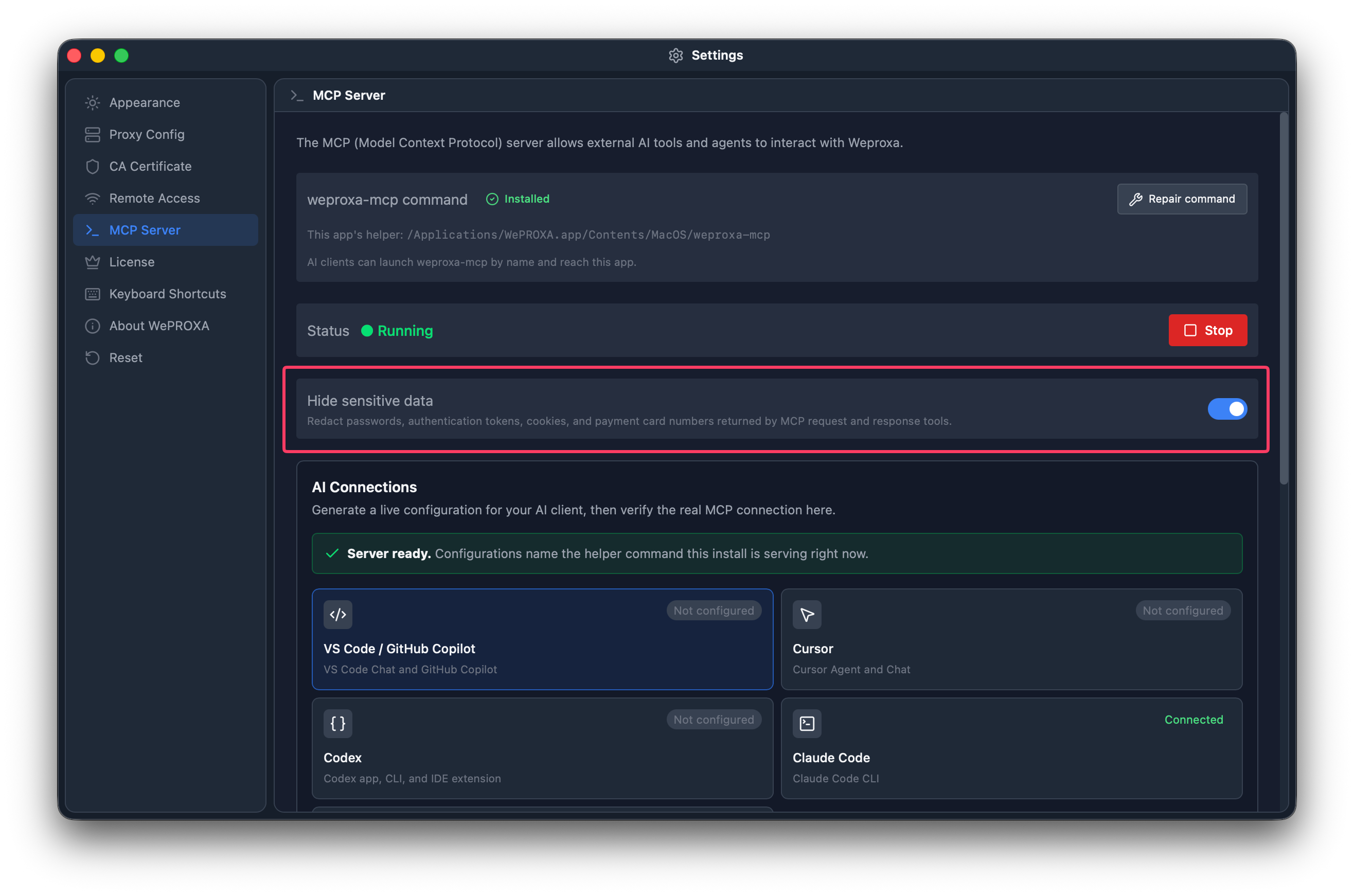
Keep sensitive-data hiding enabled when an AI client reads captured traffic.
2. Install the MCP and skills plugin
Section titled “2. Install the MCP and skills plugin”The WePROXA plugin installs the connection together with skills for connection checks, traffic inspection, and mock-scenario authoring. With Node.js 20 or newer, run:
npx @weproxa/wizard@latest mcp addThe installer supports Codex, Claude Code, GitHub Copilot CLI / VS Code, and Cursor. Use --client <name> to choose one target, or follow the manual installation steps. Fully quit and reopen the AI client after installation so it inherits the current command path.
Start with a harmless connection check:
Use WePROXA to report the current proxy status. Do not start, stop, or modify anything.A working connection exposes tools whose names begin with weproxa_, including weproxa_proxy_status.
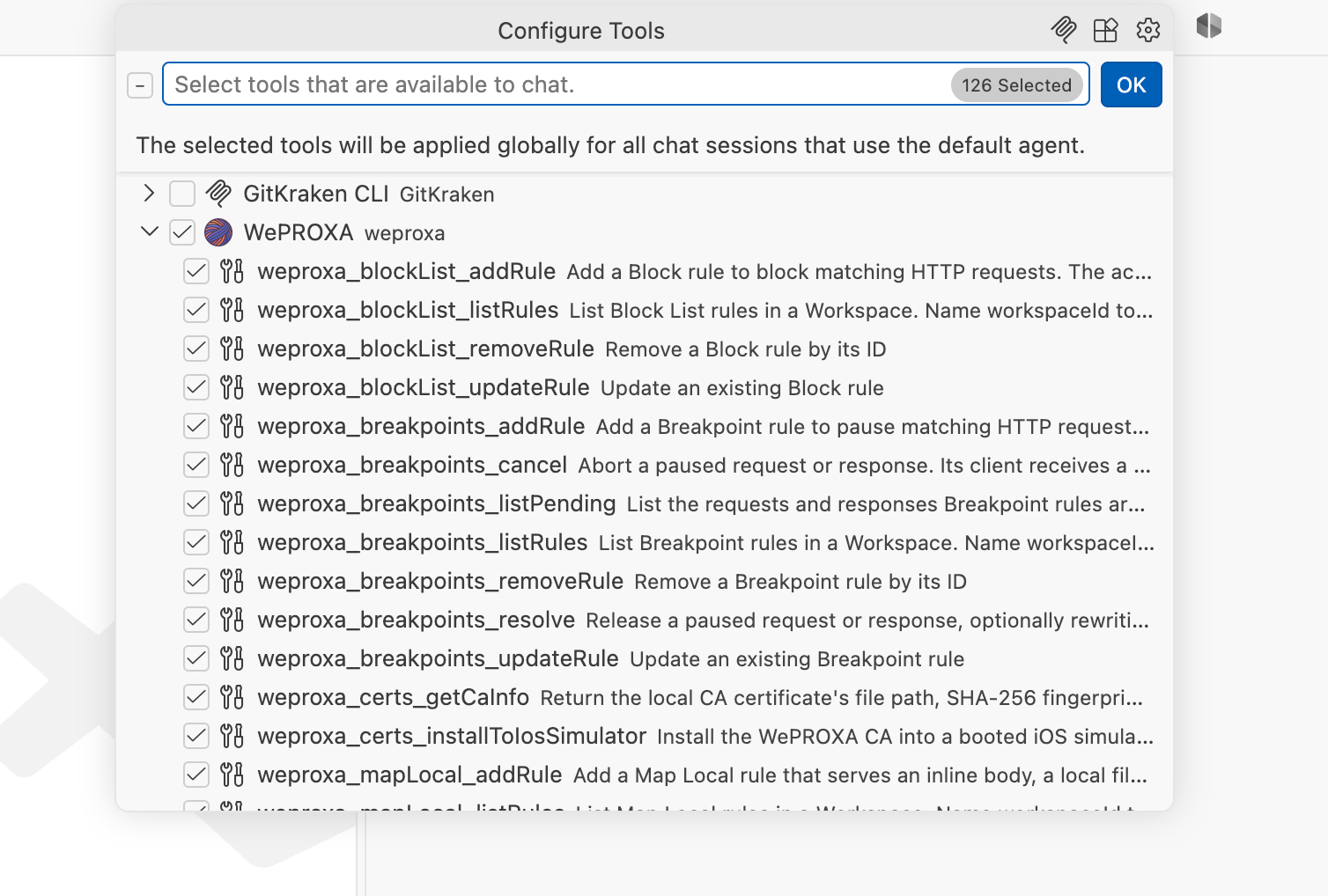
A read-only proxy status check verifies the connection without changing WePROXA.
Example 1: ask AI to diagnose a captured failure
Section titled “Example 1: ask AI to diagnose a captured failure”First, create a predictable failure that is safe to inspect.
- In WePROXA, add
postman-echo.comto the SSL interception host list. - With the proxy running, open https://postman-echo.com/status/503 in your browser.
- Confirm that a
GET /status/503request appears with status503.
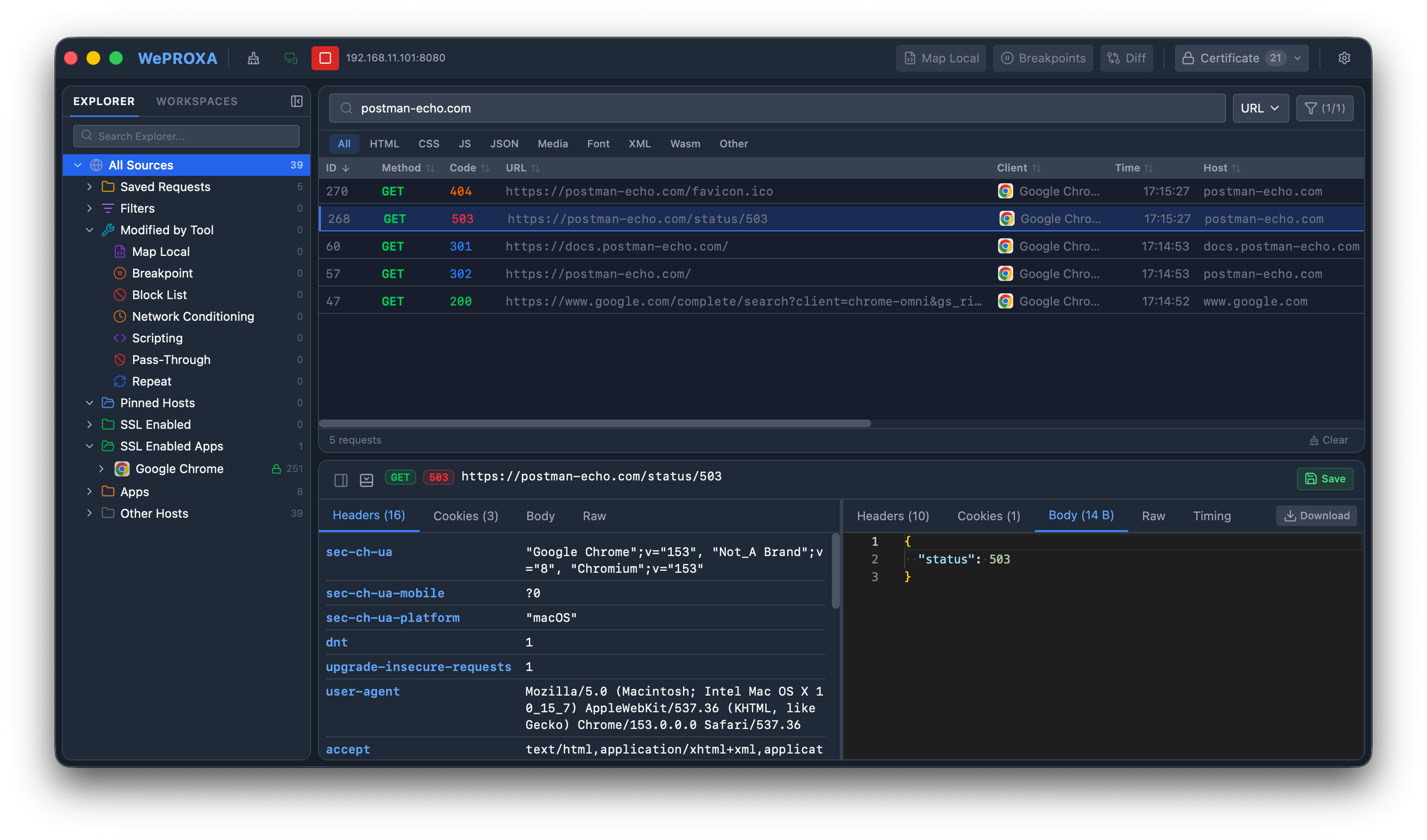
The test endpoint produces a predictable 503 capture for the diagnosis.
Now give the agent a narrow, read-only task:
Use WePROXA to find the most recent GET request to host postman-echo.com withpath /status/503. Inspect its request and response, explain why the call failed,and give me the next useful check. Do not create rules or change WePROXA state.The agent should check the proxy state, find the matching capture, and fetch only that request and response. A useful answer will separate observed facts from guesses: the origin returned 503, the request completed over HTTPS, and this test endpoint intentionally returns the requested status. Because the endpoint has no useful response body, the diagnosis should not invent an application error message.
This same prompt structure works on a real app. Replace the host and path, or ask for the 20 most recent responses with status 400 or higher. The agent can group failures, inspect representative bodies, and point out patterns such as expired authentication, a malformed route, or repeated upstream errors.
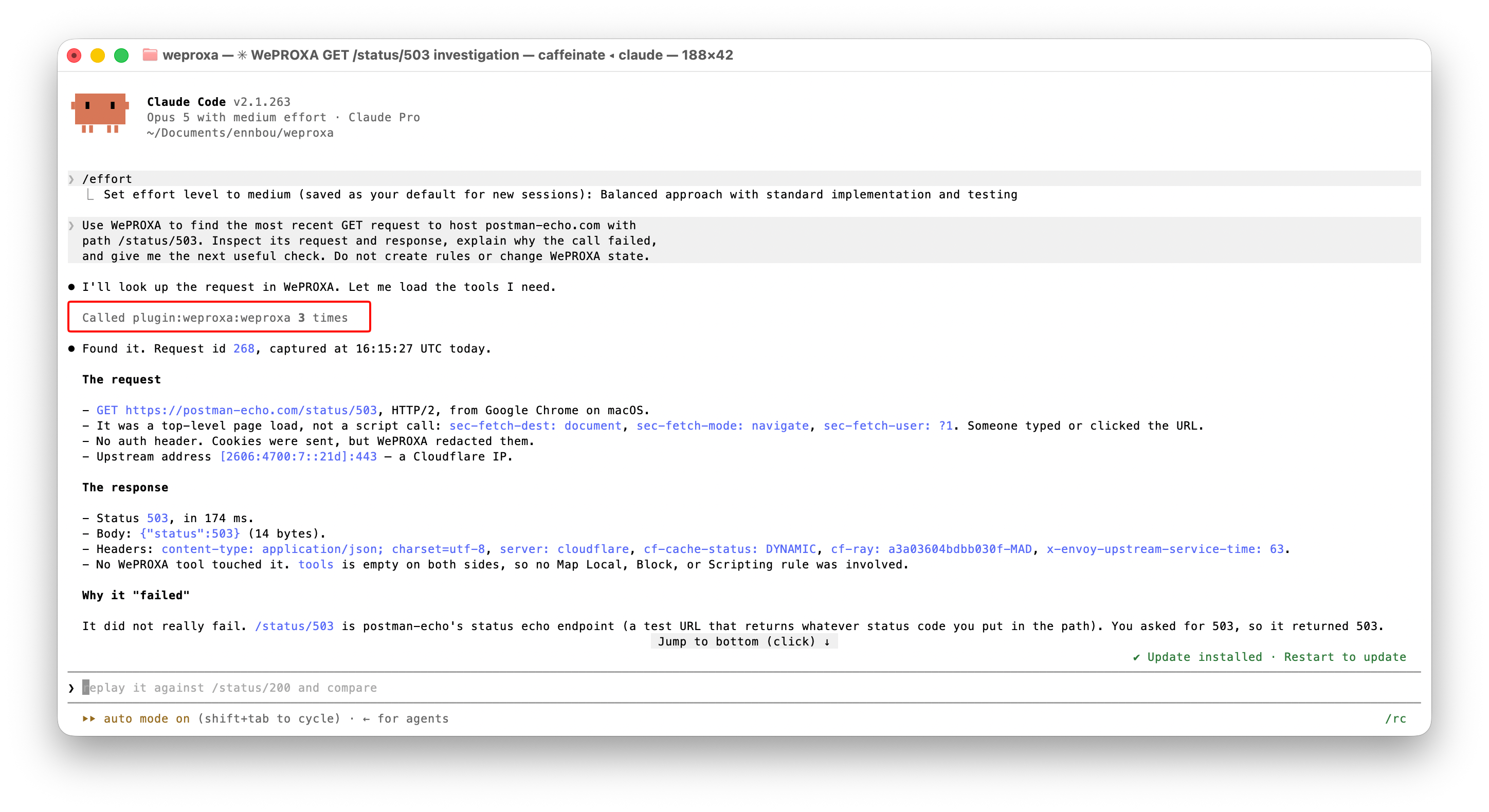
The diagnosis should distinguish captured evidence from assumptions.
Example 2: ask AI to replace the failure with a local response
Section titled “Example 2: ask AI to replace the failure with a local response”Suppose the backend is unavailable but you still need to build the frontend’s success state. Ask the agent to create an inline Map Local rule:
Use WePROXA to replace GET https://postman-echo.com/status/503 with an inlineMap Local response for this demo.
Use these values:- name: Postman Echo — local recovery- method: GET- status: 200- content-type: application/json- body: {"status":"ok","source":"WePROXA Map Local"}
First report the active Workspace and Scenario and check for an existing MapLocal rule that already covers this endpoint. Show me the exact proposed rule andwait for my confirmation before creating it. Do not change unrelated rules.
This prompt makes the state change explicit and gives the agent a stop point before it modifies live traffic. After you approve the rule, refresh the same URL in the browser.
The browser should now receive:
{ "status": "ok", "source": "WePROXA Map Local"}The new capture should show status 200 and Map Local as the response tool. That marker matters: a successful body alone does not prove your fixture answered the request.
Ask the agent to verify it:
Use WePROXA to inspect the newest GET /status/503 capture. Confirm whether MapLocal answered it, identify the answering rule, and compare the new status andbody with the earlier 503 capture. Do not make any further changes.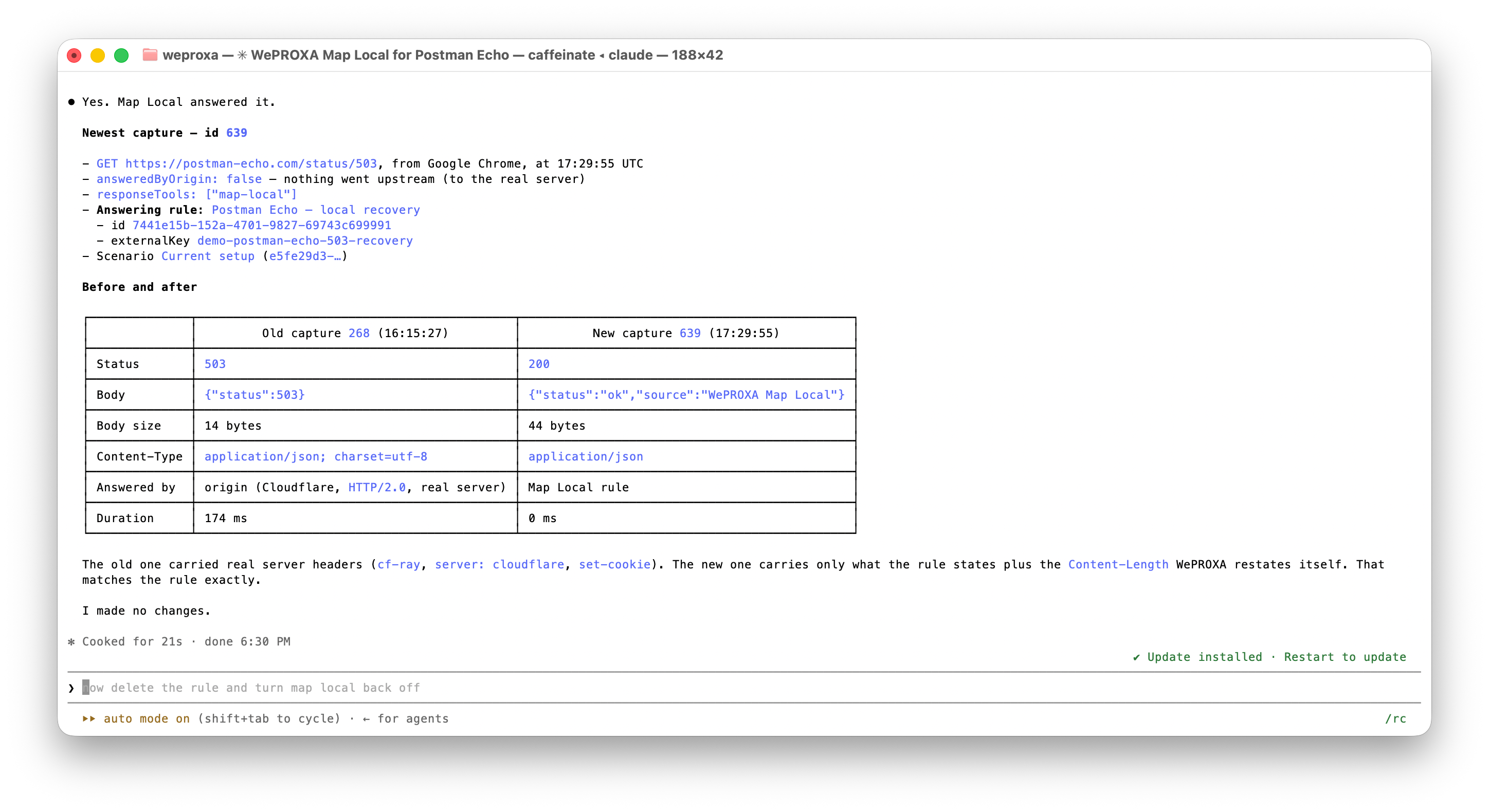
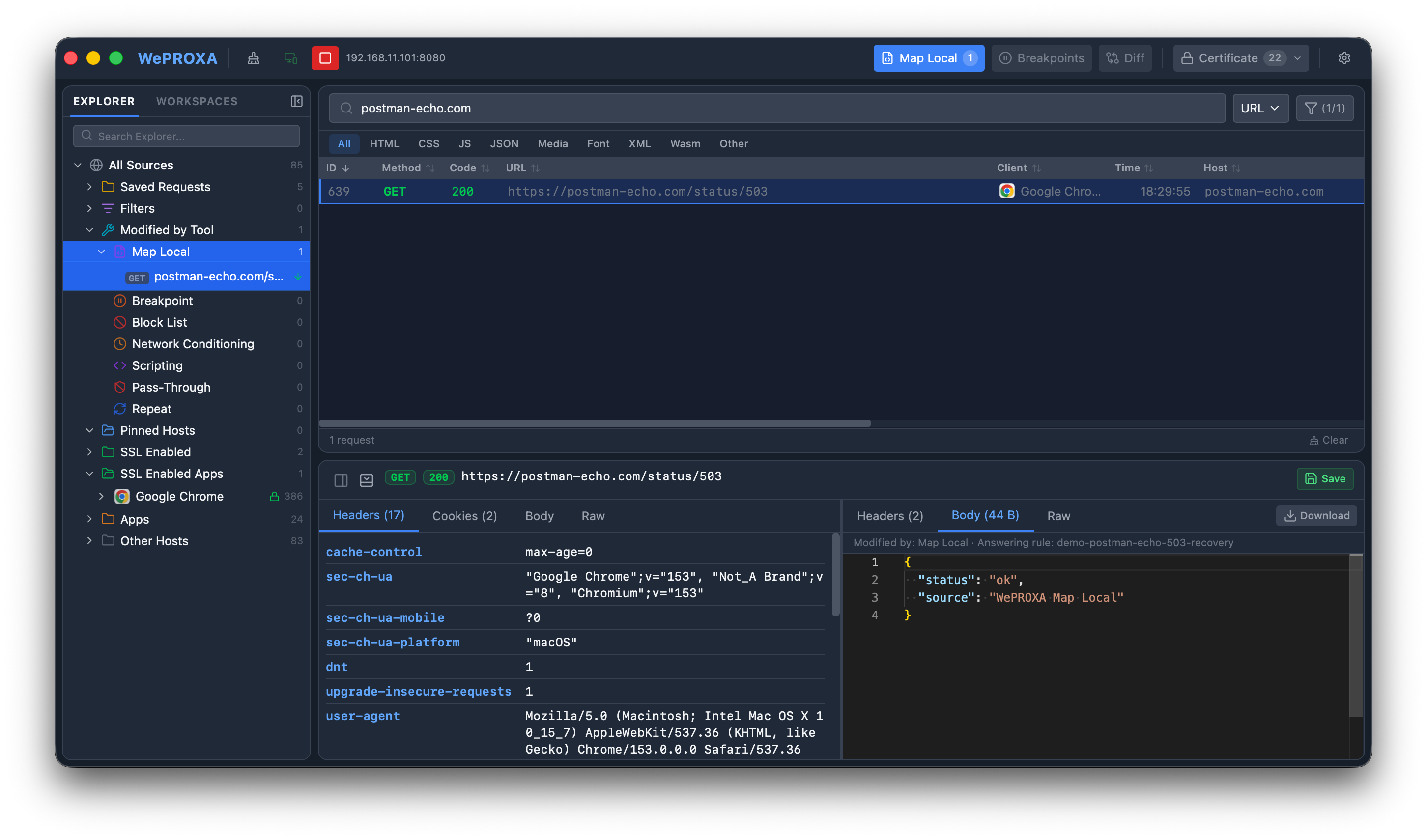
The Map Local marker proves that the local rule—not the origin—returned the new response.
When the exercise is finished, disable or remove only the new rule. The agent should have reported its rule ID, which gives cleanup a precise target:
Show me the Map Local rule created for this demo and its ID. Ask for confirmation,then remove only that rule. Do not modify any other rule.Why this is more useful than pasting logs into chat
Section titled “Why this is more useful than pasting logs into chat”The agent can move through a verifiable debugging loop:
- Observe the traffic WePROXA actually captured.
- Inspect the request and response bodies needed for this question.
- Explain the failure using evidence from the exchange.
- Propose a rule or test setup before changing state.
- Verify the next capture and identify which rule answered it.
That last step closes the loop. The goal is not merely to generate a plausible mock; it is to prove that the app received the intended response.
Keep the workflow safe
Section titled “Keep the workflow safe”- Leave Hide sensitive data enabled. Redaction is more useful than sending credentials, cookies, payment details, or tokens to an agent.
- Begin investigations with read-only language such as “do not modify WePROXA.”
- For rule creation, activation, proxy lifecycle, or cleanup, ask the agent to preview the exact change and wait for confirmation.
- Scope prompts to a host, path, client, Workspace, Scenario, or capture session when other apps are generating traffic.
- Verify
responseToolsand the answering rule after a mocked request. Do not treat a matching status code as proof. - Keep WePROXA and the AI client on the same computer and OS user. The private MCP endpoint is local by design.
Continue with your own API
Section titled “Continue with your own API”Replace the demonstration host with one endpoint from your application and try this read-only prompt:
Use WePROXA to list the 20 most recent captured responses with status 400 orhigher for <YOUR_API_HOST>. Group them by method, path, and status. Inspect atmost three representative request and response bodies, redact sensitive values,and tell me the most likely root cause. Do not change WePROXA state.When you are ready to automate a repeatable workflow, explore Agent Skills, Scenarios, and Pass-Through Containment. Together they let an agent build fixtures, package a reproduction, and prove that no unmatched request quietly escaped to a real backend.