
Advanced Filtering
Weproxa includes a multi-layered filtering system that lets you quickly find the exact requests you’re looking for among thousands of captured entries.
Quick Filter
Section titled “Quick Filter”The filter bar at the top of the request list lets you search with three modes:
- URL — searches across the full URL, host, and path
- Request — searches the HTTP method, URL, and client/app name
- Response — searches the status code and content type
Select the mode from the dropdown next to the filter input. Search is instant and case-insensitive.
Content-Type Filter
Section titled “Content-Type Filter”A row of category buttons sits above the request list for quick content-type filtering:
all · html · css · js · json · media · font · xml · wasm · other
Click a button to show only that type. Cmd+Click (macOS) or Ctrl+Click (Windows/Linux) to select multiple types at once.
Query Builder
Section titled “Query Builder”For more complex queries, use the advanced query builder:
-
Click the filter icon in the toolbar to expand the query builder panel
-
Add conditions using the visual builder
-
Combine conditions with AND / OR logic
-
Nest groups for complex expressions (e.g.,
(host = api.example.com AND method = POST) OR status > 499)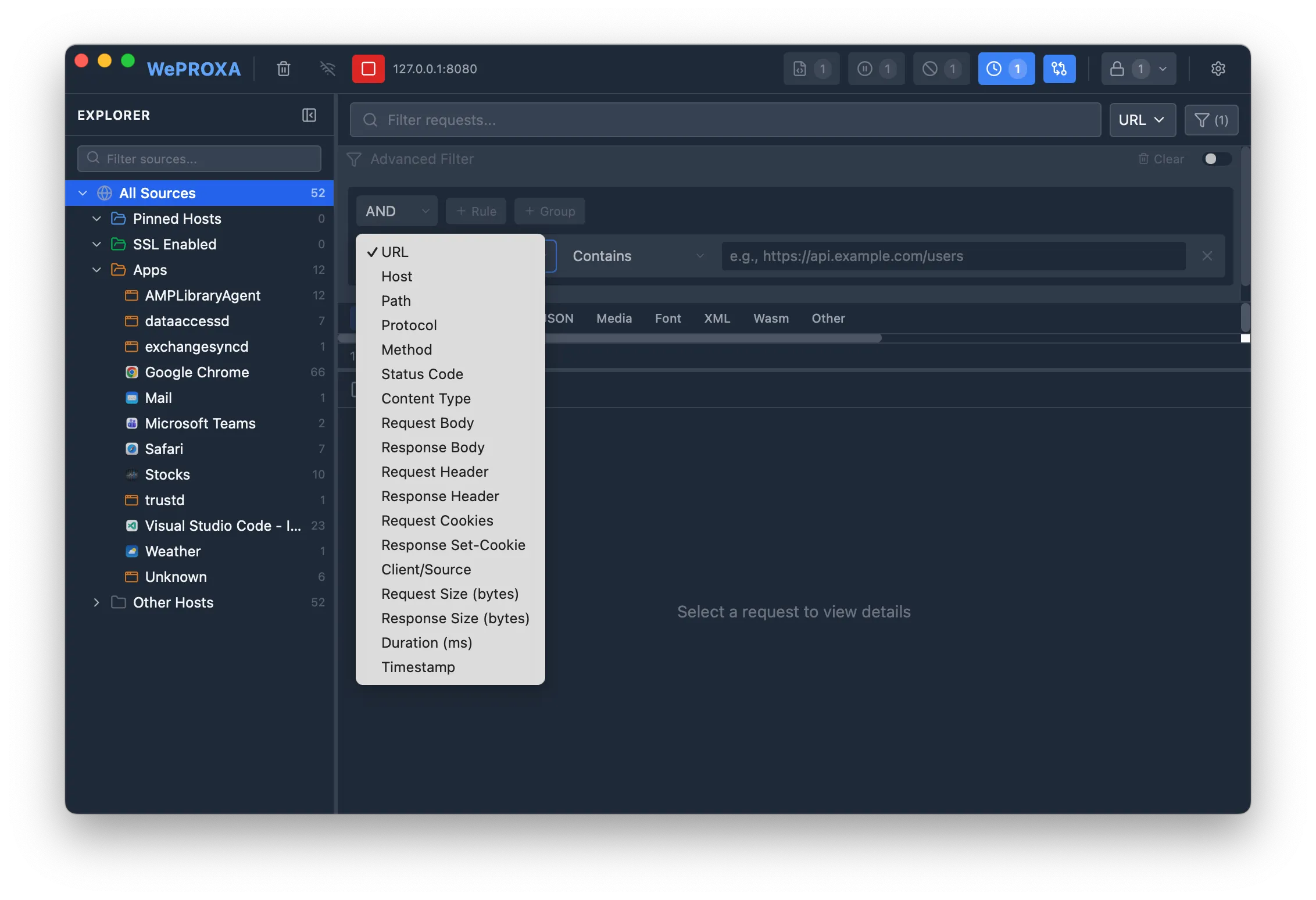
Use Cmd+Click (macOS) or Ctrl+Click (Windows/Linux) on the filter icon to enable or disable the filter without clearing your rules.
Available Fields
Section titled “Available Fields”Text fields
Section titled “Text fields”- URL — the full request URL
- Host — the server hostname
- Path — the URL path
- Content Type — response MIME type
- Client/Source — the application that made the request
- Request Body — the request payload content
- Response Body — the response payload content
- Request Header — search across request header names and values
- Response Header — search across response header names and values
- Request Cookies — cookies sent with the request
- Response Set-Cookie — cookies set by the response
Enum fields
Section titled “Enum fields”- Method — HTTP method (GET, POST, PUT, DELETE, PATCH, HEAD, OPTIONS, CONNECT, TRACE)
- Protocol — HTTP version (HTTP/1.0, HTTP/1.1, HTTP/2, HTTP/3, WebSocket)
- Status Code — HTTP status code, with wildcard support (e.g.,
2xxfor any 200-level,4xxfor any 400-level)
Numeric fields
Section titled “Numeric fields”- Duration — request round-trip time in milliseconds
- Request Size — request body size in bytes
- Response Size — response body size in bytes
Date fields
Section titled “Date fields”- Timestamp — when the request was captured
Operators
Section titled “Operators”Different field types support different operators:
Text operators
Section titled “Text operators”Equals · Does not equal · Contains · Does not contain · Starts with · Ends with · Matches regex · Is empty · Is not empty
Numeric operators
Section titled “Numeric operators”= · ≠ · > · < · ≥ · ≤ · Between
Enum operators
Section titled “Enum operators”Equals · Does not equal · Is one of · Is not one of
Date operators
Section titled “Date operators”Equals · Before · After · Between
How Filtering Works
Section titled “How Filtering Works”Weproxa uses a split filtering strategy for performance:
- Simple queries (URL, host, path, method, status, etc.) are evaluated client-side for instant results
- Body and header queries (request/response body, headers, cookies) are sent to the backend for evaluation, with a 300ms debounce to avoid excessive searches
This split happens automatically — you don’t need to choose. The query builder routes each query to the appropriate engine based on the fields used.
- Use
status code→is one of→4xx, 5xxto find all error responses - Combine
host contains apiANDmethod equals POSTto find API mutations - Filter by
content type contains jsonto see only JSON responses - Use
matches regexfor complex pattern matching (e.g.,/api/v[0-9]+/users) - Use
duration > 1000to find slow requests (over 1 second) - Use
response body contains errorto search inside response payloads