
Map Local
Map Local lets you serve a local file, an inline body written on the rule, or an asset fetched from a remote URL in place of a remote resource, without changing your server or application code.
How It Works
Section titled “How It Works”When a request matches a Map Local rule, WePROXA intercepts it and responds from that rule’s source instead of forwarding the request to the remote server. The request never reaches the origin.
If the local file is not found, the request falls through and is forwarded to the origin server as normal — unless Pass-Through containment is sealing the proxy, in which case an unmatched request is refused instead of forwarded.
Creating a Map Local Rule
Section titled “Creating a Map Local Rule”-
Open the Map Local tool from the toolbar
-
Click Add Rule
-
Fill in the rule details:
- Name — a descriptive label for the rule
- URL Pattern — a glob pattern to match URLs (e.g.,
https://api.example.com/v1/*) - Method — optionally restrict to a specific HTTP method (GET, POST, PUT, etc.), or leave as “Any” to match all methods
-
Choose the Response Source — a local file, an inline body, or a remote URL (see Response Source):
- Local file — Browse to select an existing file, Create File to save the current editor content as a new mock file, or leave the path empty and WePROXA creates a managed mock file for the rule when you save
- Inline body — write the response body directly in the editor below; nothing is written to disk
- Remote URL — enter an HTTP(S) URL and WePROXA fetches that asset on demand
-
Optionally set a Status Code and Response Headers to override what the source returned (see Status and Header Overrides)
-
Optionally add Request Match Conditions so the rule answers only some of the requests its URL pattern accepts (see Request Match Conditions)
-
Enable the rule
Managing Rules
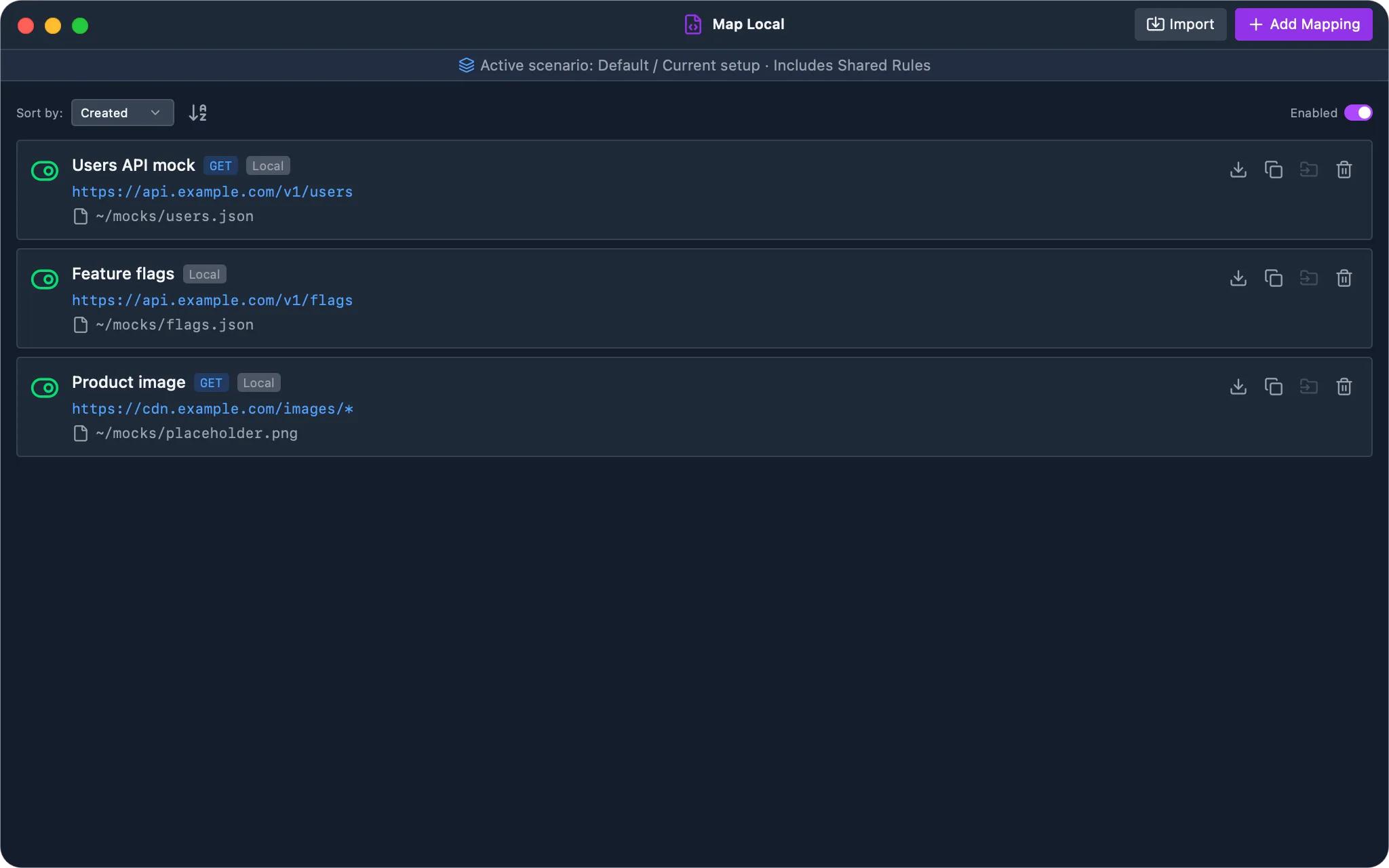
Section titled “Managing Rules”- Toggle individual rules on or off using the toggle switch next to each rule
- Toggle all rules at once using the global enable/disable button
- Sort rules by name, creation date, or last updated date
- Edit or delete rules at any time
- Duplicate a rule to create an independent copy of its pattern and response content
- Export and import rule files when you need to share mocks with a team
Each rule card shows its source as a Local, Inline, or Remote badge, and a rule carrying request match conditions shows how many it has, so a rule that answers only part of its URL pattern is visible without opening it.
Toggling a rule takes effect on the next matching request — there is no need to restart the proxy or reload the tool after switching one back on.
Rule Precedence
Section titled “Rule Precedence”When several enabled rules match the same request, the first rule in precedence order answers and the rest never run. Precedence is resolved in this order:
- Priority — higher wins. A rule with no priority sits in the neutral band, which is where every rule sat before the field existed.
- Creation time — within one priority band, the oldest rule wins.
- Rule ID — a stable tiebreaker for rules that share a timestamp, such as a bulk import.
Precedence follows creation time, not the order shown in the panel, so re-sorting the list or editing a rule does not change which one serves the response. The ordering is stable across edits and app restarts, and it is the same order every listing shows — the rule listed first is the rule that will actually answer.
If an overlapping rule is not producing the response you expect, narrow its URL pattern, add request match conditions, or give it a higher priority. Deleting and recreating a rule makes it the newest and therefore the lowest priority of its band.
Duplicating Rules
Section titled “Duplicating Rules”Duplicating a Map Local rule copies its current response content into a new WePROXA-managed file. The original and duplicate can then be edited or deleted independently without changing the other rule’s response.
When you remove a rule, WePROXA deletes only response files it manages. Files you selected with Browse remain on your computer even after the rule is removed.
Exporting & Importing Rules
Section titled “Exporting & Importing Rules”You can export and import Map Local rules to share configurations across devices or with your team.
- Export — click the download icon on any rule card to save it as a
.weproxa-map-local.jsonfile. The export includes the rule settings (name, URL pattern, method) and the full response file content. - Import — click the Import button in the toolbar to load a previously exported rule file. WePROXA recreates the rule and its mock file automatically.
Exports are limited to 32 MB of file content, and imported files can be up to 48 MB.
This is useful for:
- Sharing API mocks with teammates
- Backing up your rules before switching machines
- Distributing pre-configured mock setups for a project
Response Source
Section titled “Response Source”Each Map Local rule serves its response from one of three sources:
- Local file — serve JSON, text, images, video, or audio from a file on disk. Paths selected in the file dialog, typed by hand, or authored through MCP all use the same backend reader, so the editor and preview see the same file the proxy serves. WePROXA watches the file for external edits, and this source works offline. This is the default.
- Inline body — the response body is stored on the rule itself and nothing is written to disk. There is no file to place, no path to keep valid, and no file to lose when the rule moves between machines. Best for small JSON fixtures and forced error payloads.
- Remote URL — point the rule at an HTTP or HTTPS URL. WePROXA fetches that asset on demand the first time a matching request arrives; the response is not saved to disk, and a bounded in-memory cache keeps repeat matches fast. This is handy for swapping in a replacement image, script, or bundle hosted elsewhere without downloading it first.
When you pick Remote URL, WePROXA validates the address inline and only accepts a well-formed http:// or https:// URL.
An inline rule carries its whole response in the Scenario bundle it is exported in, so a fixture set built from inline rules is portable with no attached files.
Status and Header Overrides
Section titled “Status and Header Overrides”Any rule, whatever its source, can override the status code and response headers the source produced. Overrides are applied after the source built its response, so they work identically for a local file, an inline body, and a remote URL.
- Status Code — must be between
100and599. Leave it empty to keep whatever the source returned:200for an inline body or a plain local file, the status line of a file written in HTTP response format, or the upstream status for a remote URL. - Response Headers — each entry replaces a same-named header coming from the source (matched case-insensitively) rather than being appended next to it. Header names not listed are passed through unchanged.
This is what lets one rule turn a captured 200 into a 503 without editing the payload, or attach a Cache-Control header to an asset fetched from a remote URL.
Request Match Conditions
Section titled “Request Match Conditions”A rule matches on URL pattern and method by default. Request Match Conditions narrow it further, so several rules can share one endpoint and each answer a different request — ?page=1 versus ?page=2, valid versus invalid credentials, authenticated versus anonymous. This replaces dropping down to a script for cases that are only about telling requests apart.
Conditions read the incoming request, never the mocked response. Every condition you add must hold for the rule to answer; a rule whose conditions do not all hold is skipped, and the next rule in precedence order gets its chance.
Four kinds of condition are available:
| Condition | Reads | Notes |
|---|---|---|
| Request Query Parameters | A named query parameter | Names are case-sensitive |
| Request Headers | A named request header | Names are case-insensitive |
| Request Body Contains | The whole request body | Plain substring match |
| Request Body JSON Path | A value inside a JSON request body | Paths look like user.email or items[0].id; a leading $. is accepted and ignored |
Each condition (except Body Contains) uses one of three operators:
- equals — present and exactly equal to the value you gave. For a JSON path, a string also matches the equivalent number or boolean, so
"42"matches42. - exists — present with any value.
- absent — not present at all.
A request whose body is not valid JSON satisfies no JSON path condition, including absent — an unparseable body is not treated as a request that merely omitted the field.
Pattern Matching
Section titled “Pattern Matching”Map Local rules support flexible URL matching with glob patterns:
- Exact URLs —
https://api.example.com/data.json - Glob patterns —
https://api.example.com/v1/* - Host-only —
*api.example.com*to match all requests to a specific domain
As you type a URL Pattern, WePROXA validates the glob live and shows whether it’s valid. The same check runs across all rule panels — Map Local, Block List, Breakpoints, Network Conditioning, and Scripting — and patterns can’t contain spaces.
Response File Format
Section titled “Response File Format”The local file can be a plain file or a full HTTP response with custom status code and headers.
Plain File
Section titled “Plain File”If the file contains just the response body, WePROXA serves it with a 200 status code and a default Content-Type of application/octet-stream:
{ "message": "Hello from local file" }HTTP Response Format
Section titled “HTTP Response Format”To control the status code and headers, write the file in HTTP response format:
HTTP/1.1 200 OKContent-Type: application/jsonX-Custom-Header: my-value
{ "message": "Hello with custom headers" }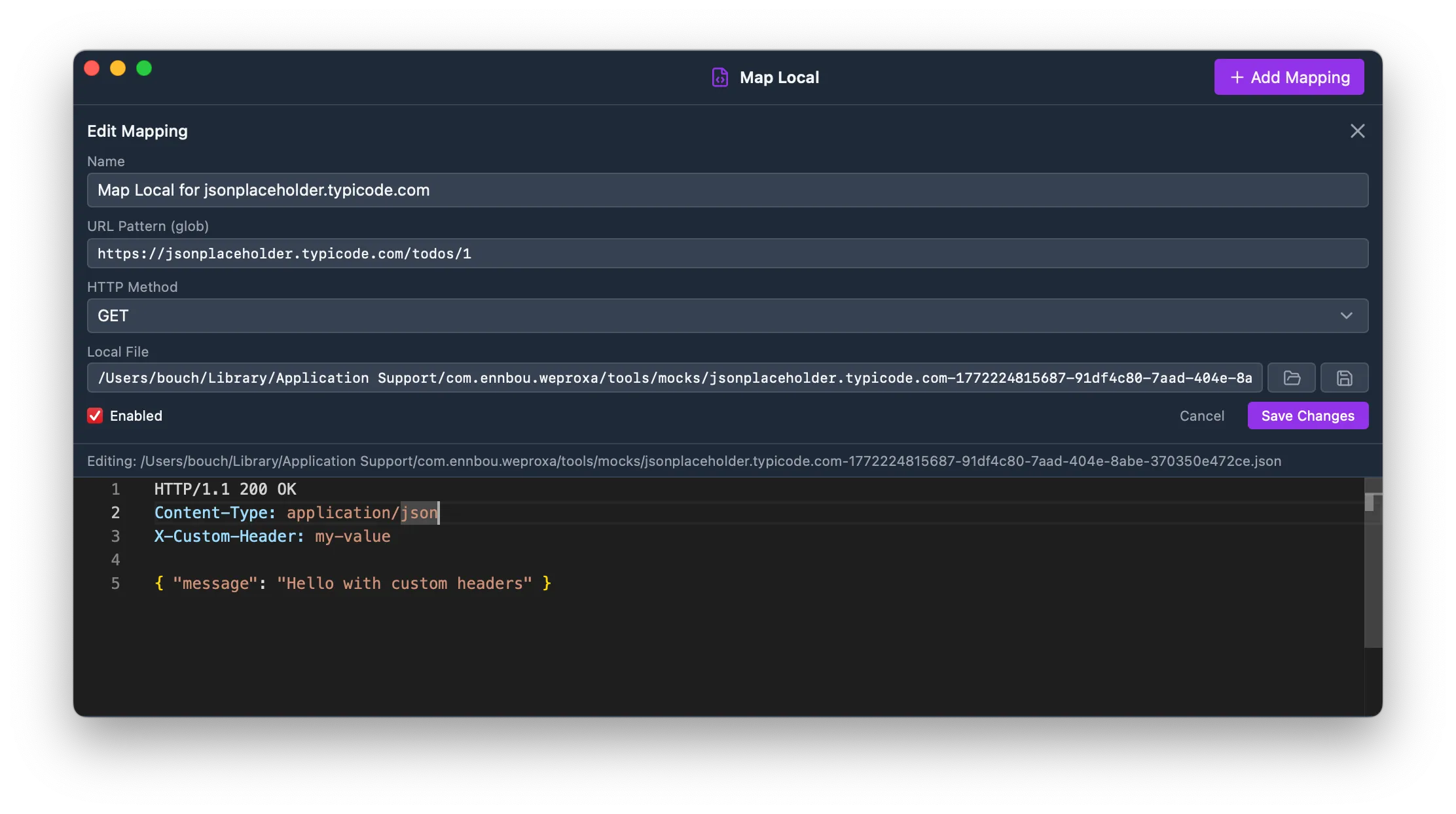
The status line (HTTP/1.1 NNN) and headers are parsed automatically. Everything after the blank line is the response body.
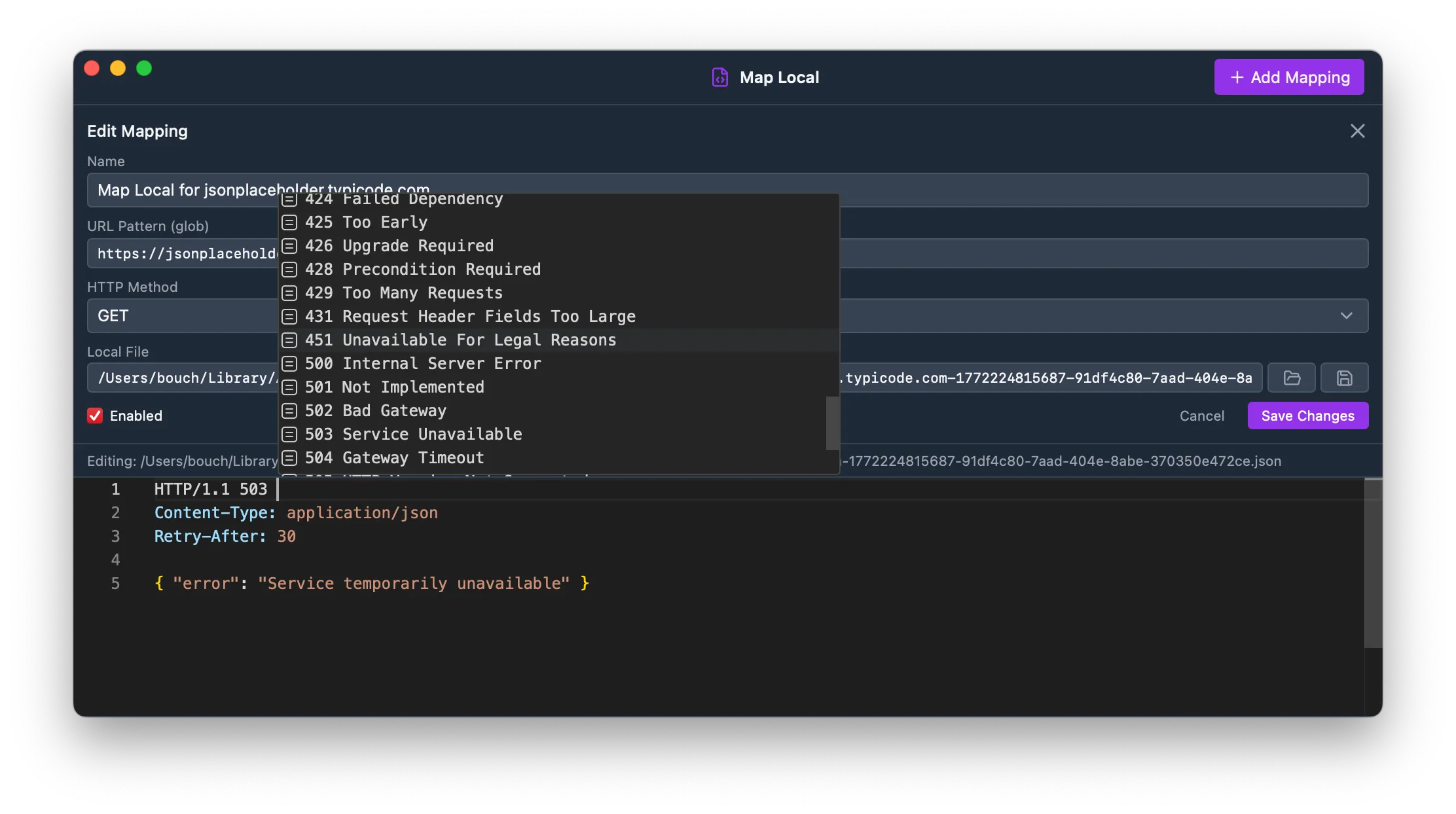
This lets you simulate error responses, redirects, or custom headers without any server changes:
HTTP/1.1 503 Service UnavailableContent-Type: application/jsonRetry-After: 30
{ "error": "Service temporarily unavailable" }
The editor supports autocompletion for HTTP headers — just start typing a header name and press Ctrl+Space to see suggestions based on common headers and the headers from the original response.
Editing Response Files
Section titled “Editing Response Files”The Map Local panel includes a built-in Monaco editor with syntax highlighting for editing text response files directly. The editor auto-detects the language (JSON, HTML, etc.) from the file content.
A typed or MCP-authored path loads after the field settles, just like a path chosen with Browse. While a path is still changing, saving is disabled so a half-typed filename cannot be created or overwritten. If the target does not exist yet, the editor keeps your content and creates the file when you save the rule; its parent directory must already exist.
Press Cmd+S (macOS) or Ctrl+S (Windows/Linux) to save changes to the file. The save button and inline saved indicator confirm when the file has been written.
Saves are atomic: WePROXA writes the complete replacement beside the target and renames it into place. The proxy and file watcher therefore see either the previous complete fixture or the new complete fixture, never a partially written response.
The text editor reads and writes UTF-8 files up to 8 MiB. WePROXA refuses to overwrite a path it could not safely read and reports the specific reason inline: permission denied, path is not a regular file, file is too large, content is not text, or another I/O failure.
Recognized image, video, and audio files use the media preview instead of the text editor. Raw previews are limited to 24 MiB; larger media remains available to the proxy but is not decoded in the window. Unsupported binary formats show an explanatory placeholder rather than being interpreted as text.
When the response body is JSON, the editor validates it as you type. A subtle Valid JSON indicator confirms well-formed content, and a malformed body shows an inline Invalid JSON message with the parser error and a Line n, Col n link that jumps straight to the problem.
If you open Map Local in a detached window, the title bar includes Import and Add Mapping actions so you can manage mocks without returning to the main window.
File Watching
Section titled “File Watching”WePROXA automatically watches your local files for changes. When you edit a mapped file in an external editor, the updated content is picked up immediately — no need to restart or reload rules.
Use Cases
Section titled “Use Cases”- Frontend development — serve local JS/CSS while using a production API
- API mocking — return local JSON files with custom status codes and headers
- Testing — simulate error responses (404, 500, 503) without changing server code
- Offline development — work without network access by serving cached responses